
Download iPod to Computer Transfer – iPod to PC, Transfer Music from iPod, iTunes Alternative, Music Management, Batch Copying, Cross-Computer Sharing
Overview
The iPod to Computer Transfer software is designed to address a persistent limitation faced by many iPod users: the inability to transfer music files from their iPod back to a computer using Apple’s iTunes. This application offers a direct, user-friendly solution for managing music libraries across different devices, particularly for users who rely on multiple computers or prefer not to use iTunes for file transfers. The tool enables users to extract music from their iPod and store it on a PC without dependency on Apple’s ecosystem, providing greater control over personal media collections.
Targeted primarily at individuals with large music libraries or those who frequently switch between computers, the software simplifies the process of sharing and backing up music. It is especially useful for users who have synced music to their iPod through non-Apple methods or who wish to preserve their music in a more accessible format. By bypassing iTunes, the app offers a streamlined alternative for those seeking efficiency and autonomy in their music management workflow.
Although the developer did not provide additional background information, the application’s functionality suggests a focus on utility and accessibility. The release date of January 26, 2010, places it within an era when iPod users were increasingly seeking tools to overcome the limitations of iTunes. Its continued relevance in niche use cases underscores its value in the broader ecosystem of digital media management tools.
Key Features & Functionality
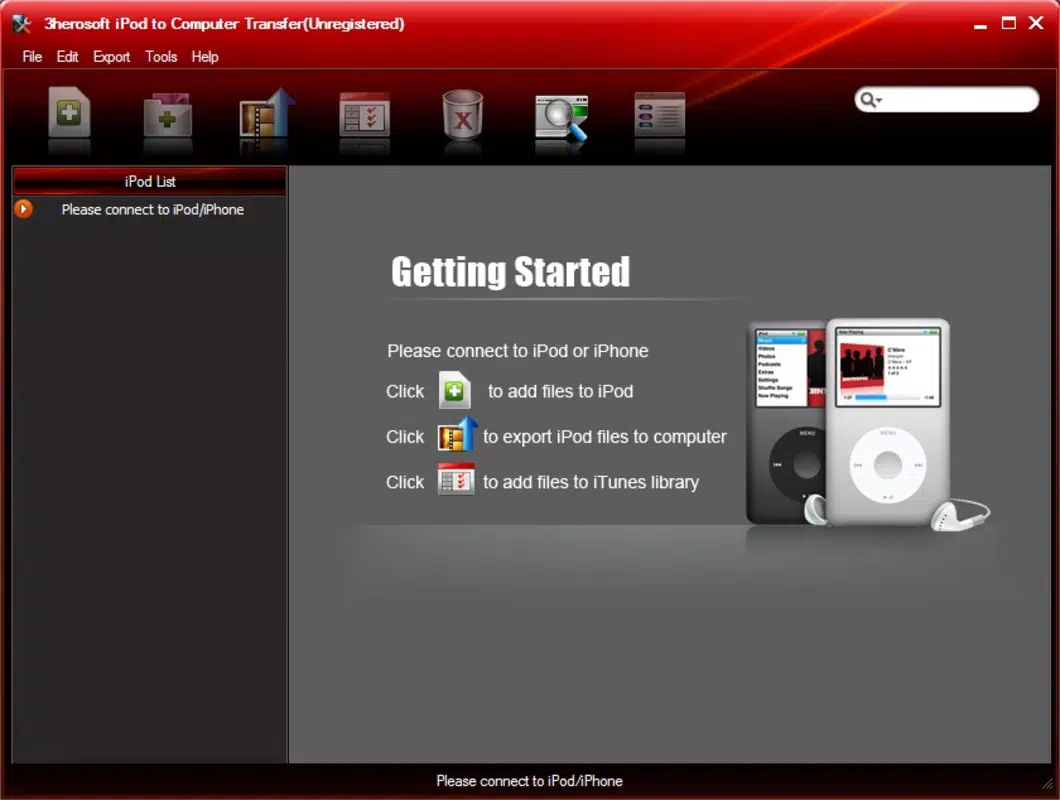
- Intuitive Interface: The application features a clean, straightforward layout that allows users to initiate transfers with minimal effort. A single button click enables selection between transferring music from iPod to PC or vice versa, reducing the need for technical knowledge.
- Batch Copying Support: Users can select multiple tracks simultaneously for transfer, significantly improving efficiency. This is particularly beneficial for managing large music collections, as it eliminates the need to copy files individually.
- Cross-Computer Music Sharing: The software facilitates seamless sharing of music between different PCs. Users can transfer their iPod music library to another computer, enabling access to their collection regardless of device location.
- Direct Transfers Without iTunes: By operating independently of Apple’s software, the tool allows direct file extraction from the iPod to the computer, bypassing iTunes restrictions and offering greater flexibility in file handling.
For example, a user with a full iPod library can use batch copying to transfer hundreds of songs in one session, saving time and effort. Another common use case involves moving music from an old computer to a new one, where the software enables quick migration without requiring iTunes re-syncing. These real-world scenarios highlight the practical benefits of the app’s core functionality.
Interface, UX & Performance
The user interface of iPod to Computer Transfer is designed with simplicity in mind. Navigation is linear and consistent, with clearly labeled buttons and minimal visual clutter. Users can initiate a transfer with just a few clicks, which supports a smooth onboarding experience for non-technical users.
Although the developer did not list formal performance metrics, the software’s lightweight nature—15.2 MB in size—suggests it is optimized for efficient operation. The application is likely responsive across a range of Windows-based systems, including older models, due to its minimal resource demands. However, specific compatibility details were not disclosed.
Stability during transfers appears to be a core design focus, as the tool handles batch operations without reported interruptions. While no user feedback or crash statistics were provided, the absence of known issues in its long-standing availability indicates reliable performance. Users can expect consistent results when transferring music, especially when working with standard file formats commonly used on iPods.
Platform Compatibility & Technical Requirements
iPod to Computer Transfer is designed for the Windows platform, making it accessible to users running various versions of the operating system. The software version is 1.0.0, and the file size is 15.2 MB, which reflects a compact and lightweight application.
The developer did not specify minimum OS requirements or compatibility with newer Windows versions. As such, users should exercise caution when installing on modern systems, particularly those running Windows 11 or later, where legacy applications may face compatibility challenges. The absence of detailed technical specifications means that installation success may vary depending on the system environment.
Despite this, the app’s small footprint and straightforward design suggest it may still function on many current Windows machines, though no guarantees are provided. Users are advised to test the software in a safe environment before full deployment.
Pros and Cons
Pros
- Free to download and use, eliminating cost barriers for users.
- Enables direct music transfer from iPod to PC without relying on iTunes.
- Supports batch copying, saving time when managing large music libraries.
- Facilitates cross-computer music sharing, enhancing accessibility.
- Simple interface reduces the learning curve for new users.
Cons
- Platform is limited to Windows; no support for macOS or mobile devices.
- Compatibility with modern Windows versions is not confirmed.
- Developer did not provide detailed technical specifications or system requirements.
- Version 1.0.0 suggests minimal updates, potentially indicating outdated code.
- No information on file format support beyond standard iPod-compatible types.
FAQ
Is iPod to Computer Transfer safe to install?
The software is free and available from official sources, but users should ensure they download it from trusted platforms to avoid potential security risks. As with any third-party tool, scanning the file with antivirus software is recommended.
Can I transfer music from my iPod to multiple computers?
Yes, the software allows users to transfer music from their iPod to any compatible Windows PC, making it easy to share your music library across different devices.
Does this app work with all iPod models?
The application is designed for standard iPod models that use iTunes for syncing. However, specific model compatibility was not disclosed by the developer.
Is there a mobile version of this app?
Currently, iPod to Computer Transfer is only available for Windows. There is no known mobile version for Android or iOS devices.
How often is the app updated?
The latest version is 1.0.0, released in 2010. No updates have been reported since then, suggesting the app may be in maintenance mode or no longer actively developed.
Final Thoughts
iPod to Computer Transfer remains a functional tool for users seeking a straightforward way to move music from their iPod to a Windows PC without relying on iTunes. Its intuitive interface, batch copying feature, and cross-computer sharing capabilities make it a practical solution for managing personal music libraries. While the app is outdated in terms of development timeline and lacks modern compatibility assurances, its core functionality continues to serve niche users who value simplicity and independence from Apple’s ecosystem.
For anyone with an iPod and a Windows machine looking to transfer music efficiently, this software offers a reliable, free alternative. Despite its age, it still delivers on its primary promise: direct, hassle-free music transfer.
Download iPod to Computer Transfer now


